
The guide
Ads Manager says 40 purchases. Shopify says 28. Your cost per purchase looks brilliant, your ROAS looks healthy — and your bank account disagrees. That gap is a tracking problem, not a campaign problem. When Meta cannot see a purchase, it cannot optimise for the next one. When it counts one purchase twice, it optimises for a customer who does not exist. Either way, the budget follows bad data. This guide fixes tracking in order. It starts with the Pixel and the Conversions API. Then it covers deduplication between the two, and the match quality that ties an event to a real person. It also covers the change landing on November 12, 2026, six days from now. It moves your reported numbers whether you touch anything or not.
The four failure points, the correct Pixel + Conversions API setup, the deduplication rule that stops double-counting, the Event Match Quality score, a pre-spend verification checklist, and what Meta's November 12 on-device measurement change means for your Black Friday reporting.
Key takeaways
Why does Meta Ads tracking break in the first place?
Start with what tracking is: a visitor buys, your site tells Meta, and Meta has to believe it. That chain has four links, and most broken setups have a broken link, not a broken campaign.
The first link is the Pixel in the browser: a JavaScript snippet that fires events from the visitor's browser to Events Manager. Ad blockers block it, slow pages fire it late, and a network error drops it silently. Every event the Pixel loses is a conversion Meta never sees.
The second link is the server path. The Conversions API sends the same events from your server, so it survives the problems that kill Pixel events. Stores that run the Pixel alone are measuring with one eye closed.
The third link is deduplication. Run both paths and Meta receives every purchase twice. Without a rule for merging the copies, it counts both. Reported revenue doubles, cost per result halves, and scaling decisions follow numbers that never happened.
The fourth link is matching. Meta has to connect an event to a real account before it can attribute the sale or optimise for the next one. An event with no usable customer information is counted as unattributed and teaches the algorithm nothing.
The same discipline applies to search. Our guide to how much Google Ads cost in 2026 makes the same point there. The click price decides whether a channel earns its keep — and that only holds when the click is measured honestly.
Meta has retired the old Aggregated Events Measurement ranking: no more manual eight-event prioritisation for web events. What decides quality now is matching, deduplication and values.
What does a correct Pixel + Conversions API setup look like?
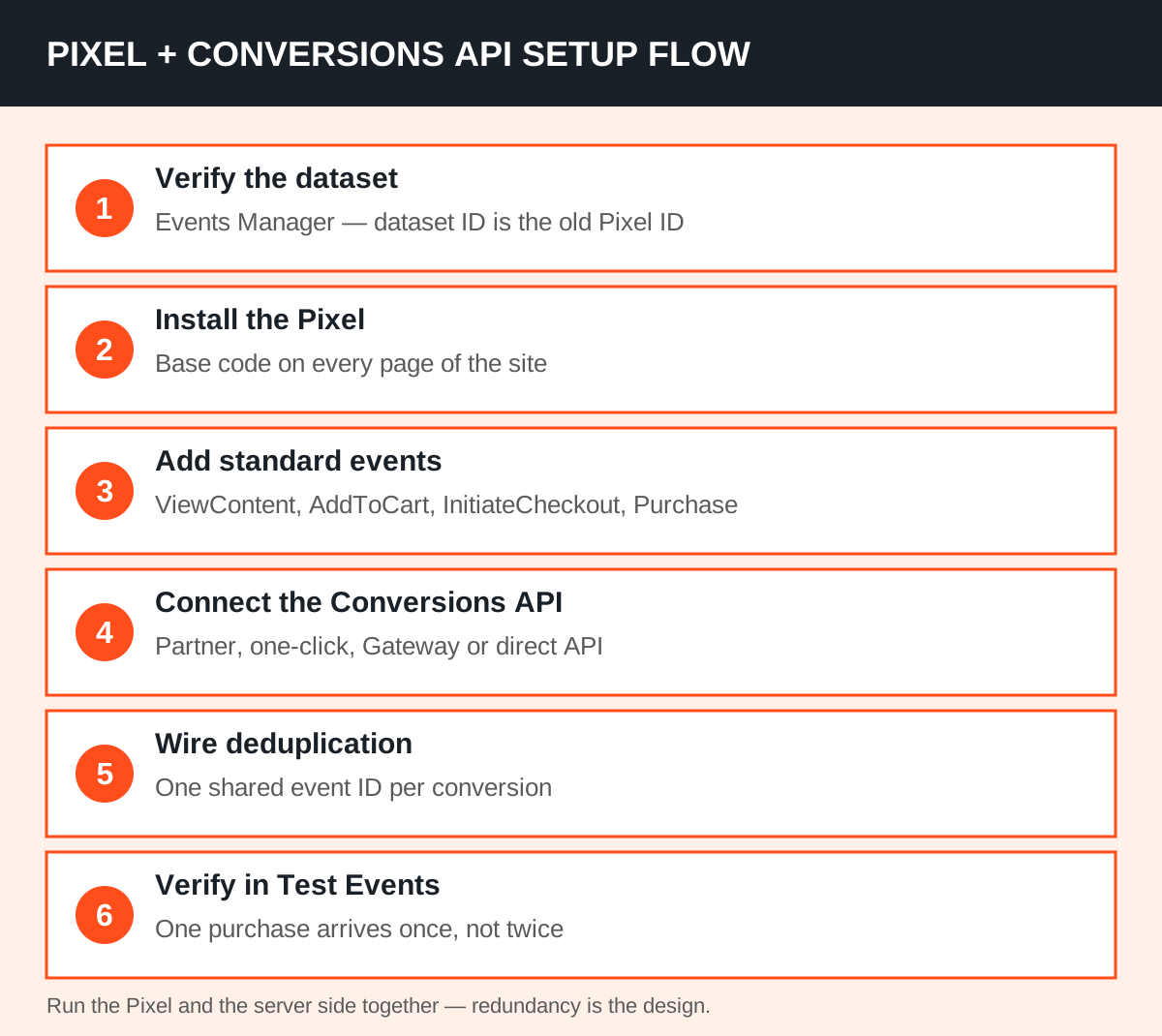
The correct setup is redundant on purpose. The Pixel and the Conversions API send the same events, and Meta merges them into one. The Pixel catches browsing in real time; the server path recovers the events the browser loses.
Meta reported in April 2026 that advertisers running both saw an average 17.8% lower cost per result.
Four ways to connect the server side — pick by your platform and your team, not by fashion.
| Route | Best for | Cost | Effort |
|---|---|---|---|
| Partner integration (Shopify, WooCommerce) | Most stores | Included in the platform | Lowest — partner handles deduplication |
| Meta-enabled Conversions API (one-click) | Sites already running the Pixel | Free | Lowest — switched on in Events Manager |
| Conversions API Gateway | No-developer teams on custom sites | Cloud fees from about $30 a month | Under 30 minutes, in your own cloud account |
| Direct API integration | Custom checkouts, full control | Developer time | Highest — you build it |
Meta announced the one-click Meta-enabled option in April 2026: it mirrors your Pixel's events server-side. If your Events Manager offers it, it is the fastest route for a store without a developer.
Create or verify the dataset in Events Manager. The dataset ID is the same number that used to be your Pixel ID, so an old Pixel migrates rather than being replaced. Install the Pixel base code on every page.
Add standard events for the actions that matter: ViewContent, AddToCart, InitiateCheckout and Purchase cover most stores, from Meta's 17 standard events. Then connect the server side, wire deduplication (section 03), and verify in Test Events before budget depends on the numbers.
How do you stop Meta counting one purchase twice?
Deduplication is the step most setups get wrong. Meta's deduplication documentation says the browser and server events must share the same event name and the same event ID. When both match, Meta counts one event and discards the copy.
The practical version: generate one ID when the action happens and pass it to both sides. The order number is the natural choice — the Pixel sends it as `eventID`, the server as `event_id`.
The event name must match exactly too — Purchase and Purchase, not Purchase and purchase_complete.
The ID must be unique per conversion. Two orders sharing one ID merge into one sale. And the copies must arrive within 48 hours of each other. A server event that arrives later counts as a second purchase, so check your timing if you batch sends.
Meta generally keeps the first copy it receives, favouring the browser event if both arrive within about five minutes. No setting to tune, no toggle to flip.
The failure mode is easy to spot. Reconcile a settled week of orders against Events Manager purchases: well above your order count means duplication, well below means loss. Also check the deduplication rate: practitioner guides treat above 90% as healthy.
How do you raise your Event Match Quality score?
Event Match Quality (EMQ) is Meta's 0–10 score per event in Events Manager for Conversions API events. It answers one question: how confidently can Meta connect this event to a real account?
It is not a measure of how many events fired. A low score does not mean fewer sales — it means Meta can see fewer of the sales you are already making.
The score is built from the customer information on each event: hashed email and phone move it most, then name, city, state, zip and country. The two Facebook cookies matter too: fbp, the browser ID, and fbc, the click ID from the ad URL.
A Purchase sent with only an IP and a user agent sits near the bottom. The same Purchase with email, phone, name, zip and the click ID climbs — each extra identifier raises the odds of a match.
Normalise first, hash second, hash exactly once. For email, trim and lowercase it, then hash with SHA-256. For phone, strip symbols and leading zeros, add the country code, then hash.
Names go lowercase, no punctuation. Send hashes, never raw values — Meta never needs your customer's real email, only its hash.
Two more fixes catch most of the remaining gap. Pass the visitor's real IP address and user agent, from the original request, not your server's address.
And capture the fbc click ID from the URL when the visitor lands. Then pass it to the server event. If it never leaves the browser, the server copy cannot be matched to the ad that drove it.
One setting does much of this without code: Automatic Advanced Matching. In your dataset's settings, it collects hashed personal information from form fields and sends it alongside Pixel events. Practitioners report it often lifts a score from below 6 to above 7.
Meta publishes no pass mark, so do not chase a perfect 10. Practitioner guidance treats 7 and above as healthy for Purchase and Lead.
A ViewContent on an anonymous browse carries almost nothing, and a lower score there is structural, not a fault. Judge each event against its own funnel position.
How do you prove the fix worked before you spend?
In Events Manager, open the Test Events tab. Browse to your conversion page, and confirm the Pixel event and the server event appear as one deduplicated event, not two.
The Meta Pixel Helper extension is the second check. Load your site: green means it fired, yellow usually means a warning, red means it did not fire. A warning is often a parameter mismatch — the same mismatch that breaks deduplication.
Then reconcile against reality. Take a settled week and compare Meta-reported purchases against real orders.
Expect a gap. Meta credits conversions on its own model — seven-day click and one-day view by default — and counts view-through conversions your analytics does not.
A 10 to 20 percent variance is common; a 40 percent gap in either direction is a tracking fault, not attribution noise.
Check the coverage ratio too: guides checked against Meta's documentation cite at least 75% server-event coverage of Pixel events. Below that, the server path is not recovering enough of what the browser loses.
Our guide to Meta Ads benchmarks 2026: CPM, CPC and CTR by objective sets the other half of this maths. It covers what a click and a conversion should cost once tracking is honest. A benchmark means nothing while the denominator is wrong.
And once the numbers are honest, our break-even ROAS guide gives you the test that settles whether a campaign earns its keep. Measure cost per result, and keep only what clears your break-even number.
What changes on November 12, 2026?
Six days from publication, Meta switches on a new Pixel setting, "Measure conversions on customer devices". Trade-press coverage of the change reports it is on by default for eligible datasets. It needs no code change, and can be switched off per dataset in Events Manager.
Meta's own panel description says the measurement happens on the customer's device instead of only on Meta's servers.
The mechanism is simple. When a shopper buys, the match between the ad they saw and the purchase runs partly on their device. It uses an identifier they already gave your business — typically an email — plus temporary device data.
Meta says this recovers purchases that never reach its reports today. Your real orders do not change — only the numbers Meta reports: purchases, cost per purchase and ROAS.
Three eligibility gates decide whether it touches your store. The Pixel must sit directly on the page, not inside an iframe and not as an image-only pixel. And the site must require login with an email address or mobile number.
And it is not active for people in the EU and the UK. Many stores run optional customer accounts, so check your own Events Manager toggle rather than assuming.
What does not change matters too. Meta says the attribution window and model do not change. The feature works alongside your Pixel and Conversions API setup.
The one job before the date is a baseline: record Meta-reported purchases against real orders for the week before November 12.
November 12 is fifteen days before Black Friday. Without a baseline, you will not know whether Black Friday improved or just reported better.
Which fix do you do first?
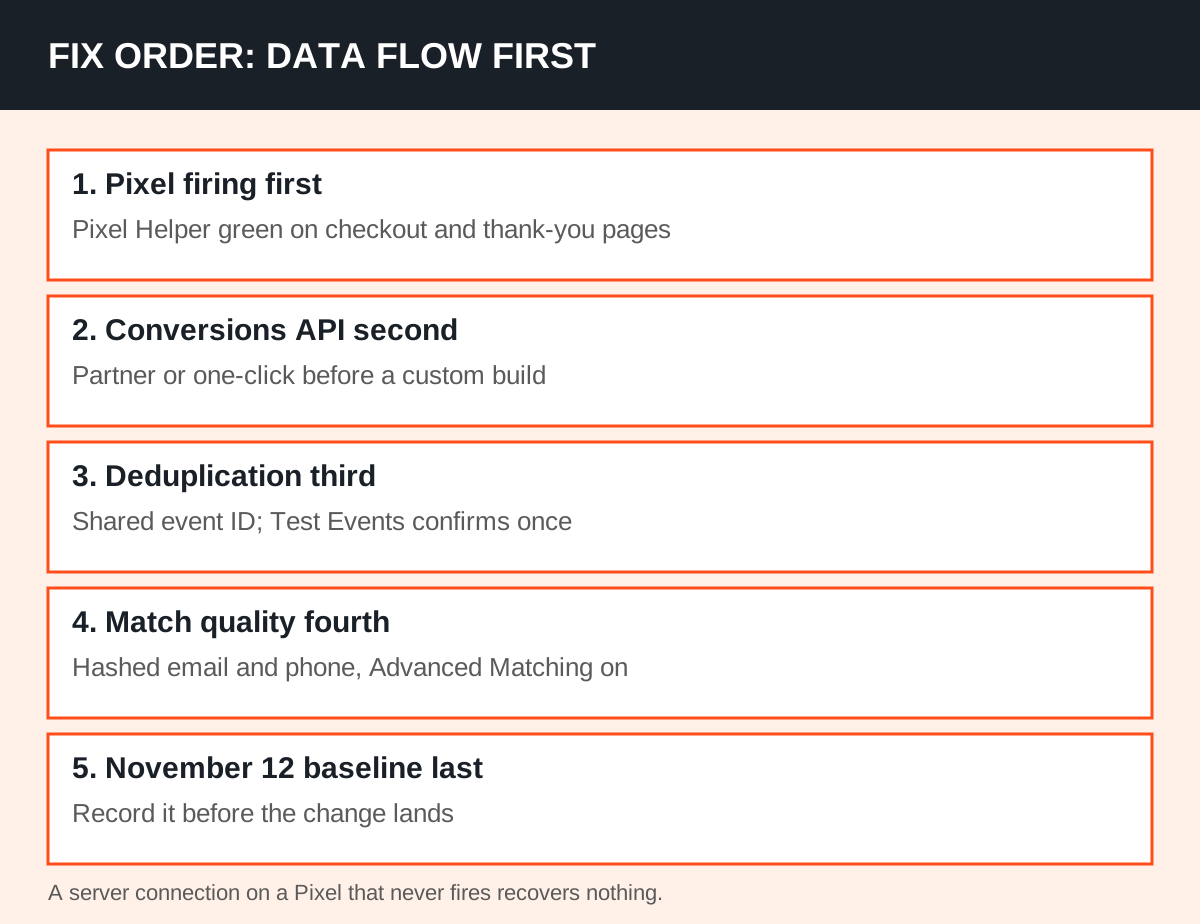
Fix in the order the data flows. A server connection on top of a Pixel that never fires recovers nothing. And deduplication on top of a broken server connection merges nothing.
First, confirm the Pixel fires where it matters — Pixel Helper green on checkout and thank-you pages. Second, connect the Conversions API by the easiest route your platform allows: a partner integration or the one-click option before a custom build.
Third, wire the shared event ID and confirm in Test Events that one purchase arrives once. Fourth, raise match quality with hashed email and phone and Automatic Advanced Matching. Fifth, record the pre-November 12 baseline.
If the whole chain feels like a lot to check by hand, that is what our free Brand Audit is for. Our team audits your website and digital presence by hand and sends a written report. And a broken Pixel is one of the first things it flags.
Once the tracking is honest, the next question is what the numbers say about your campaigns. Our paid social and PPC service runs creative testing and budget decisions on the same results.
Fix it before the budget follows the numbers. A tracking audit costs an afternoon; a month of optimisation on doubled conversions costs far more.
Frequently asked questions
Do I still need the Pixel if I have the Conversions API?
Yes — Meta recommends running both. The Pixel catches browsing behaviour in real time, while the Conversions API recovers events the browser loses to ad blockers, slow pages and network errors. The two are designed to be redundant: send the same events through both, deduplicated with one shared event ID, and Meta counts each conversion once.
Why does Ads Manager show more purchases than my store actually took?
Usually deduplication has failed: the Pixel and the server both reported the same purchase with different event IDs, or with different event names, so Meta counted both. From November 12, 2026, the on-device measurement change can also raise reported purchases without any extra orders. Reconcile a settled week against real orders, and record a baseline before November 12.
What is a good Event Match Quality score?
Meta publishes no pass mark, and the score runs 0 to 10 per event in Events Manager. Practitioner guidance treats 7 and above as healthy for Purchase and Lead, because those events should carry the email, phone and name collected at checkout. Lower scores on top-of-funnel events like ViewContent are structural — an anonymous browse carries almost nothing to match.
Will the November 12 change affect my campaigns?
It changes reporting, not sales. Meta measures some purchases on the shopper's device instead of only on its servers, which can raise reported purchases, cost per purchase and ROAS without a single extra order. The attribution window and model do not change, and you can opt out per dataset in Events Manager. Record a baseline before November 12 so you can tell a real Black Friday improvement from a reporting one.