
The guide
Six CRMs compared on real 2026 prices, free plans and fit: HubSpot free for two users, Zoho and Pipedrive from $14 a seat, Freshsales from $9 — and the hidden costs that change the ranking.
Key takeaways
What should a small business actually want from a CRM? A CRM has one job: no lead, customer or follow-up ever gets lost. Everything else is decoration until that job is done. Before you compare features, write down how you sell. Do deals move through stages, like enquiry, quote, negotiation and close?
Do you sell mostly by phone? Do you need email campaigns in the same tool?
That answer picks your category, and the category picks your CRM. A visual pipeline team needs Pipedrive or monday CRM. A phone-heavy team needs Freshsales or Close. A team that wants marketing, sales and service in one place needs HubSpot or Zoho. Buying the heaviest tool first is the most common mistake in this category.
The second question is headcount, honestly counted. Nearly every CRM charges per person who edits records. A tool that looks cheap at $14 a seat costs $140 a month for ten people, and $1,680 a year. Price the team you will have in twelve months, not the team you have today.
The third question is who will run it. A CRM with no owner becomes an empty database within a month. If nobody on your team will spend an hour a week on it, pick the simplest tool on this list, not the most powerful one.
How much does a CRM cost in 2026? The table first, the traps second.
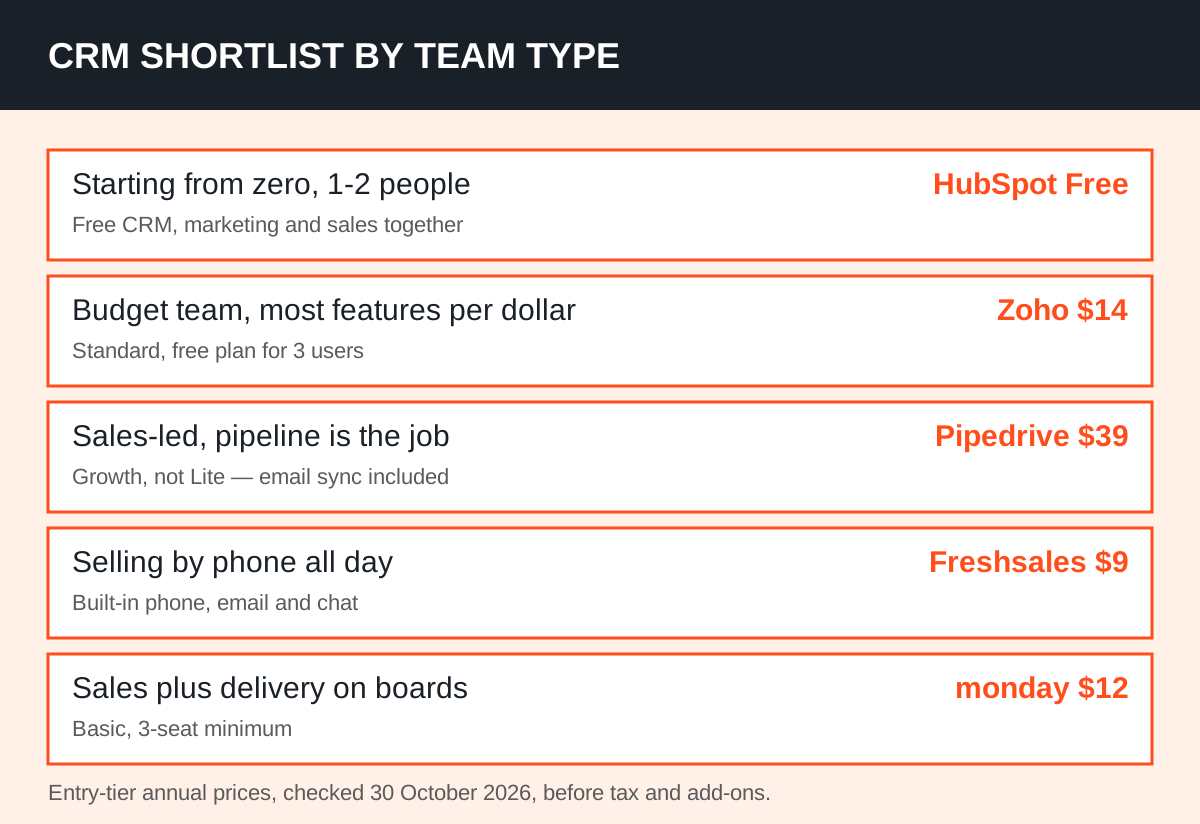
Prices below are the entry paid tier for each CRM, in US dollars per user per month on annual billing, as checked on 30 October 2026. Free plans and trials are shown separately, because they change the first-year cost completely.
| CRM | Entry paid price | Free plan | Best for |
|---|---|---|---|
| HubSpot CRM | $20 per seat (Starter list; $7 new-customer offer) | Yes, up to 2 users | Free start, marketing + sales together |
| Zoho CRM | $14 per user (Standard) | Yes, up to 3 users | Most features per dollar |
| Pipedrive | $14 per seat (Lite) | No, 14-day trial | Visual sales pipeline |
| Freshsales | $9 per user (Growth) | Yes, up to 3 users | Built-in phone and email |
| monday CRM | $12 per seat (Basic, 3-seat minimum) | No, 14-day trial | Visual teams, sales + delivery |
| Salesforce | $25 per user (Starter Suite) | No, 30-day trial | A growth path to enterprise |
Read the HubSpot row carefully, because it hides the biggest jump on this list. HubSpot's Sales Hub pricing lists Free at $0 for up to two users, Starter at a $20 list price with a limited-time $7 new-customer offer, Professional at $90 a seat a month on annual billing, and Enterprise at $150.
Professional also carries a required one-time onboarding fee of $1,500. That is the tier where forecasting and sequences live, so budget for it before you fall in love with the free plan.
Zoho's ladder is gentler. Zoho CRM pricing lists Standard at $14, Professional at $23, Enterprise at $40 and Ultimate at $52 per user a month on annual billing, with a free plan for up to three users. Monthly billing costs more at every tier, so the annual figure is only a saving if you stay the year.
Pipedrive's ladder has its own trap. Pipedrive's pricing page lists Lite at $14, Growth at $39, Premium at $59 and Ultimate at $79 a seat a month on annual billing. Lite has no email sync and no automation. Most active sales teams need Growth at minimum, which nearly triples the entry price.
Lead capture and document tools are paid add-ons on the lower tiers.
The pattern across all six is the same. The advertised price buys the door, not the house. Automation, forecasting, calling minutes, add-ons and onboarding sit one or two tiers up, or outside the seat price entirely. Compare the tier you will actually need, not the tier on the homepage.
Which CRM fits which small business? Start with your selling style, not the price list.
HubSpot fits a team that wants one platform for marketing, sales and service, and is happy to start free. Two users get contacts, deals, email tracking and live chat without a credit card. It is the right pick when your marketing already lives, or will soon live, in the same system as your sales. It is the wrong pick if you need forecasting or sequences soon, because those cost $90 a seat at Professional.
Zoho CRM fits a budget team that wants depth. Standard at $14 already includes workflows, multiple pipelines and forecasting, and the wider Zoho suite covers email, books and support if you grow into it. The trade-off is a busier interface than HubSpot or Pipedrive, and a setup that rewards a patient first week.
If your team already uses Zoho products, this choice is nearly automatic.
Pipedrive fits a sales-led team that lives in its pipeline. Deals drag between stages, activities sit on each deal, and the whole business is visible on one board. It is the fastest tool on this list to get a team using on day one.
It is the wrong pick if you want marketing automation in the same tool, because Pipedrive manages what happens after a lead enters the pipeline, not before.
Freshsales fits a team that sells by phone and email all day. The Growth plan at $9 a user a month on annual billing includes a built-in phone with call recording, email and chat, which covers most small sales teams without a separate dialler. Pro at $39 and Enterprise at $59 add AI lead scoring, advanced workflows and deeper customisation.
monday CRM fits a visual team that also coordinates delivery. If the same people who sell a job also schedule it, monday's boards carry a deal from pipeline to project without a second tool. Basic starts at $12 a seat a month on annual billing with a three-seat minimum.
Salesforce Starter at $25 suits a team that knows it will need enterprise customisation later, and is willing to pay for the growth path now.
Our AI tools explorer lists CRM and sales tools side by side with their pricing notes, which is a fast way to shortlist two or three of these before you start trials. Shortlist first, trial second — trialling six tools in a row is how teams end up choosing none of them.
What does a CRM actually cost for your team size? Multiply before you fall in love.
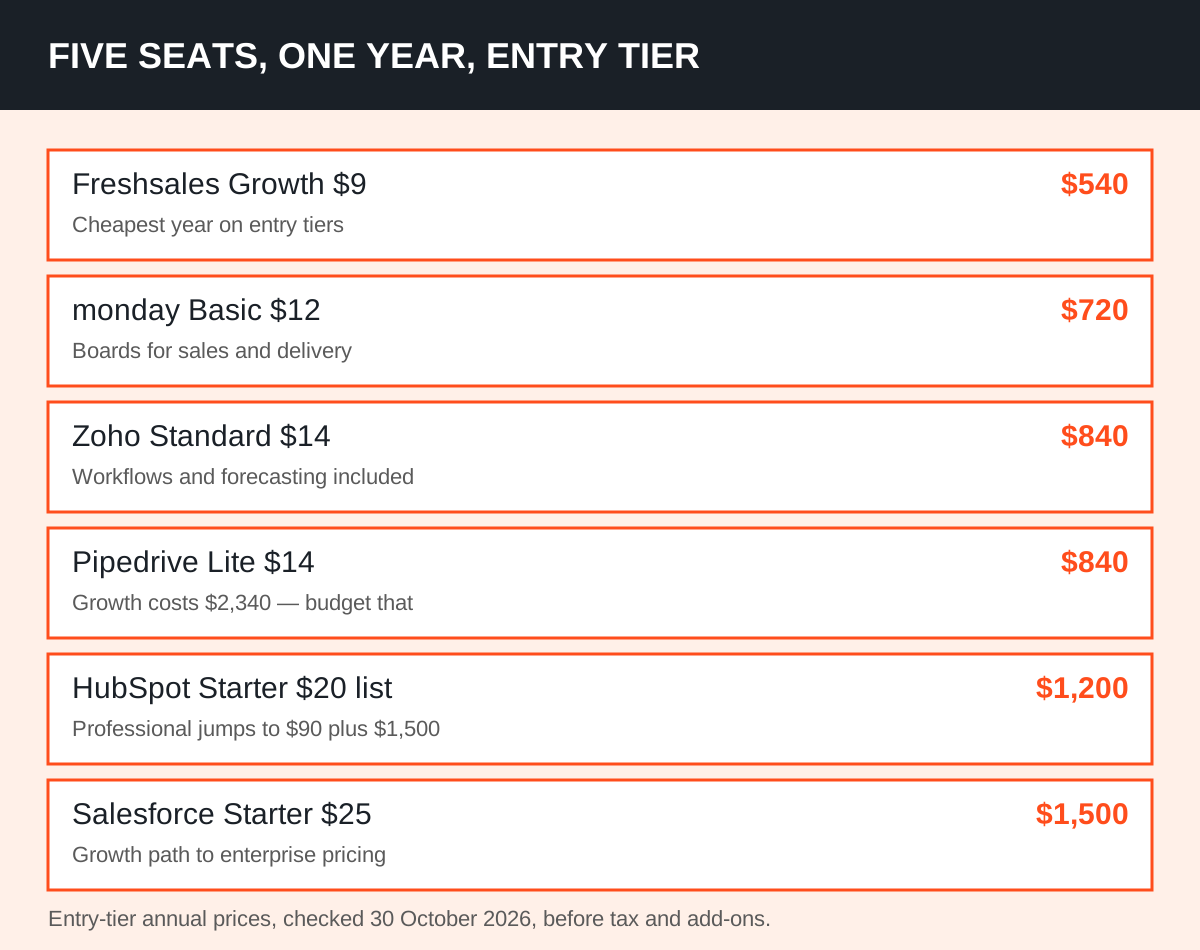
Seat prices lie by omission, because nobody buys one seat. The table below shows what five seats cost for a year on each entry tier, using the annual-billing prices above. These are our arithmetic on the published rates, before tax, add-ons and onboarding.
| CRM (entry tier) | 5 seats, one year | What is missing at that tier |
|---|---|---|
| HubSpot Starter ($20 list) | $1,200 | Forecasting, sequences, onboarding not charged at Starter |
| Zoho Standard ($14) | $840 | Process management and AI agents sit at Professional ($23) |
| Pipedrive Lite ($14) | $840 | Email sync and automation need Growth ($39), so $2,340 a year |
| Freshsales Growth ($9) | $540 | Advanced workflows and Freddy AI need Pro ($39) |
| monday Basic ($12) | $720 | Automation and integrations scale up at higher tiers |
| Salesforce Starter ($25) | $1,500 | Pro Suite at $100 is the real step up for automation |
Two lessons hide in that table. First, the cheapest seat is not the cheapest year: Freshsales at $540 beats Zoho at $840 for five seats, but only if its Growth tier covers your needs. Second, the tier you need matters more than the tier you start on.
Pipedrive looks joint-cheapest at Lite, then costs $2,340 a year once a real sales team needs Growth.
Then add the extras. HubSpot Professional adds $1,500 of onboarding once, plus any AI credits beyond the included allowance. Pipedrive add-ons such as lead capture and documents are billed per company, not per seat, on the lower tiers. Calling minutes, SMS credits and storage overages sit outside every headline price on this list.
Ask each vendor for a written quote at your seat count, including add-ons, before you sign.
That discipline is the same one we use for ad spend. Our guide to break-even ROAS shows how to judge any marketing cost against what a customer is actually worth. A CRM earns its fee the same way: if it saves one lost deal a month, it has paid for itself at any price on this list.
How do you choose in a week, without a six-month evaluation?
Run a one-week test with a fixed script, not a free wander. Pick two finalists, not six. Give each one the same ten real contacts, five real deals at different stages, and one real follow-up sequence. The tool that gets your team updating deals without being chased wins, whatever its feature list says.
Day one is setup: import contacts, build your pipeline stages, connect email. If setup takes longer than a day for a five-person team, that is a signal, not a hurdle to push through. Day two to four is real use: log calls, move deals, send the follow-ups. Day five is the verdict meeting. Ask three questions only.
Did everyone update it without reminders? Can we see next week's pipeline at a glance? Do we know the total annual cost, add-ons included?
Watch for the classic failure mode. A CRM dies when updating it feels like homework. The tool with fewer fields, filled in every time, beats the tool with forty fields, filled in never. Delete fields ruthlessly during the trial. If a field has no decision attached to it, it does not belong on the deal card.
Migration deserves one honest paragraph. Moving from spreadsheets is easy: export, clean, import, check ten records by hand. Moving from another CRM is slower, because deal history, notes and attachments rarely map cleanly. Budget a weekend for a spreadsheet move, and a week with vendor help for a CRM-to-CRM move.
Either way, freeze new entries in the old system on cutover day, or you will run two truths at once.
What are the mistakes that make a CRM fail, whatever you buy?
The first mistake is buying for the company you wish you were. A three-person team does not need territory management, approval chains or a sandbox account. Those features cost money, slow setup, and teach the team that the CRM is for management, not for them. Buy for this year's team, and upgrade when growth forces it.
The second mistake is skipping the owner. Every CRM needs one named person who checks data quality weekly, fixes duplicate contacts, and trains new starters. Without that person, pipelines rot. With them, even a free CRM stays trustworthy. Put the owner's name in the rollout plan before you pay anything.
The third mistake is judging a CRM by its demo. Demos use clean data, rehearsed clicks and a presenter who knows every shortcut. Your data is messy, your team is busy, and your first month will be clumsy. Judge by the trial week in section 05, with your own messy data, or you have judged nothing at all.
The fourth mistake is ignoring the exit. Check how you export your contacts, deals and notes before you import them. A tool that exports cleanly is a tool you can leave, which paradoxically makes it safer to commit to. If export needs a support ticket and a CSV puzzle, say so in the verdict meeting.
So which CRM should you pick? Our shortlist, by team type.
If you are one or two people starting from zero, pick HubSpot Free. It costs nothing, it is genuinely usable, and it grows into the platform most small teams end up on anyway. Move to Starter when a third editor joins, and price Professional before you need forecasting, so the $90 jump never surprises you.
If you are a budget team of three to ten that wants the most for its money, pick Zoho Standard at $14. It covers workflows, pipelines and forecasting at the entry paid tier, and its free plan lets a tiny team start without paying at all.
Accept a busier interface in exchange for a price that stays low as you grow.
If you sell through a pipeline and nothing else matters as much, pick Pipedrive Growth at $39, not Lite at $14. Lite is a tracker; Growth is a sales tool, with email sync and automation included. Budget the full Growth price from day one, and the tool will feel fairly priced instead of twice as expensive as advertised.
If you sell by phone, pick Freshsales Growth at $9. Built-in calling and email in one place is worth more than a longer feature list elsewhere. If you coordinate delivery as well as sales, pick monday Basic at $12 and use its boards end to end.
Whatever you pick, run the trial week, name an owner, and price the year, not the seat. And if the CRM feeds your email follow-up, our email lifecycle service shows how we turn a clean CRM into campaigns that actually follow up: the CRM holds the customer, the email system works the relationship.
A CRM nobody updates is an expensive address book. A CRM your team uses every day is the cheapest hire you will ever make.
Frequently asked questions
What is the best free CRM for a small business?
HubSpot's free CRM is the strongest free start: up to two users get contacts, deals, email tracking and live chat at no cost and with no expiry. Zoho CRM's free plan covers up to three users and is the better free option for a three-person team, though its paid tiers start at $14 per user a month on annual billing.
How much does a CRM cost per user per month in 2026?
Entry prices checked on 30 October 2026 run from $9 (Freshsales Growth) to $25 (Salesforce Starter) per user a month on annual billing, with HubSpot Starter at a $20 list price and Zoho Standard and Pipedrive Lite both at $14. Always multiply by your headcount and add onboarding and add-ons before comparing.
Is HubSpot or Zoho better for a small business?
HubSpot wins if you want the easiest free start and one platform for marketing and sales together, but its Professional tier jumps to $90 a seat plus $1,500 onboarding. Zoho wins on value: Standard at $14 already includes workflows, pipelines and forecasting, and its ladder rises more gently to $23 and $40.
Do I need a paid CRM, or is a spreadsheet enough?
A spreadsheet is enough until follow-ups start slipping, which usually happens around 20 to 30 active deals or three people touching the same list. At that point a CRM pays for itself by stopping lost leads, not by adding features — pick the simplest tool your team will update daily and upgrade only when growth forces it.